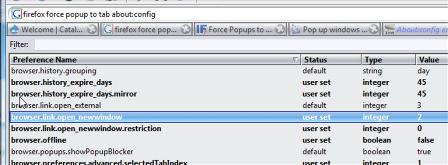
For some reason or other, Firefox does not have the option under the Tabs option items to “force links that open in new windows to open in:”. I have Firefox 2.0.0.7 now, and I don’t have that under Tabs options. But, if you open about:config in your address bar, you can change the setting manually.
Change: browser.link.open_newwindow
Mine was set to 3, which told the popups to always open in a new tab. I like that, mostly. But some web sites, TinyMCE editor in this case, like to open a popup and return you back the the original page. I keep losing that original popup. So I wanted to turn off my popup forced to new tab option. To make this behave normally, I set it to 2. All worked just peachy!